
Built-In E-Signature in BROSH CRM for Quotes and Documents
BROSH CRM includes e-signature for quotes and documents, so B2B teams can send, sign, track, and save customer agreements without buying an additional signing add-on.
For sales teams, this can be a huge saving. The cost is not only the monthly fee of a separate signature tool. It is also the integration work, duplicate user management, disconnected document storage, training, support, and the time sellers lose switching between systems.
When e-signature is part of the CRM, the signed quote or document stays close to the customer record, owner, opportunity, activity history, and follow-up tasks.
Last modified by BROSH CRM, on Wed Aug 12 2026 Israel Time
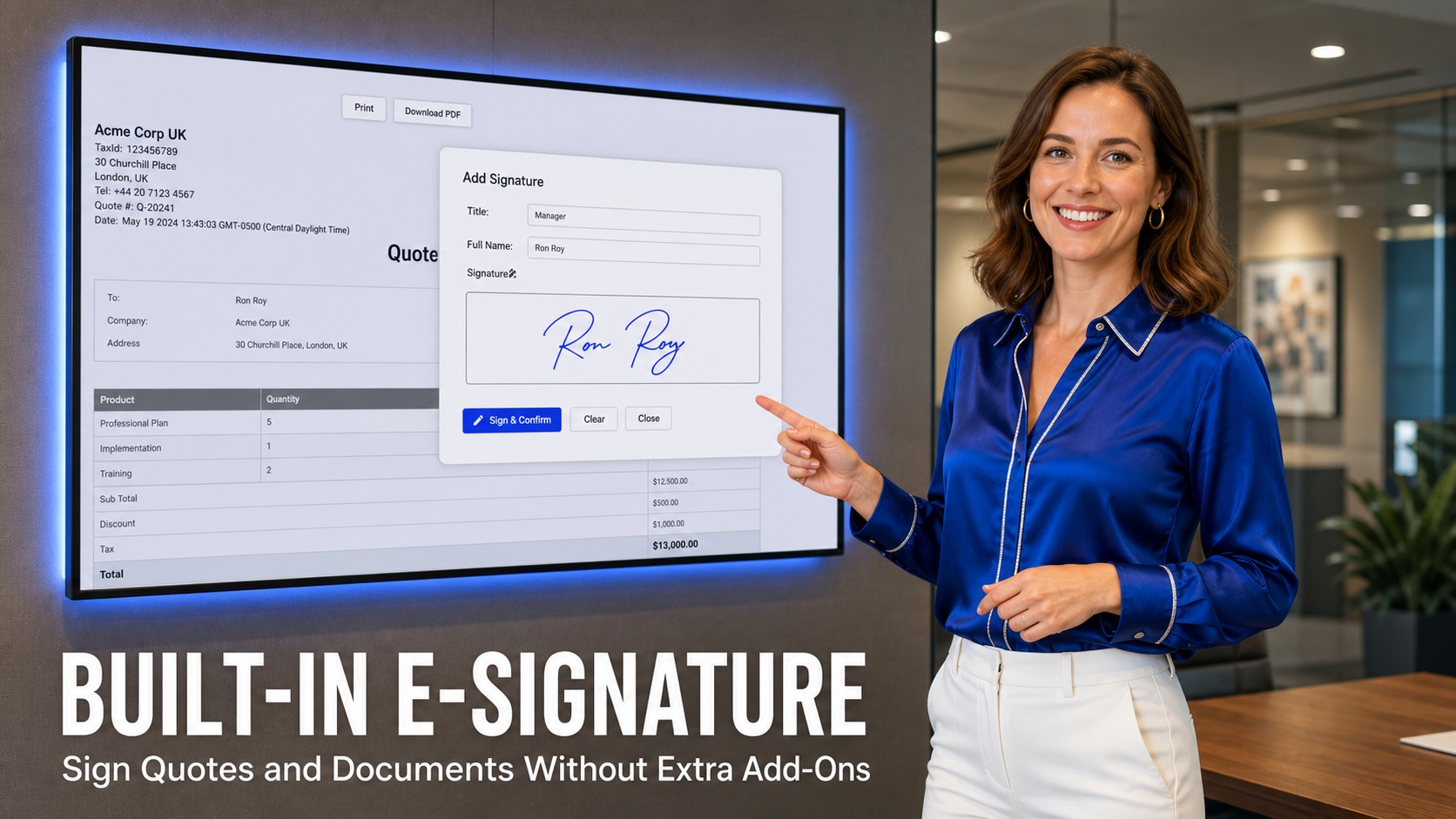
BROSH e-signature is available inside the CRM workflow for quotes and customer documents.
Why Built-In E-Signature Matters for B2B Teams
Many B2B teams still treat signing as a separate process: prepare the quote in CRM, export a PDF, upload it to another service, wait for a signature, download the final file, then manually attach it back to the account. That process creates cost, delay, and avoidable risk.
BROSH CRM makes e-signature part of the customer workflow. A salesperson can work from the quote, document, contact, account, or opportunity context instead of moving between disconnected systems.
The legal foundation for electronic signatures is well established in many business contexts. The U.S. Electronic Signatures in Global and National Commerce Act says a signature or contract generally may not be denied legal effect solely because it is electronic. Requirements still vary by jurisdiction, industry, and document type, so teams should confirm their own legal requirements.
Security and identity also matter. The NIST Digital Identity Guidelines emphasize identity proofing, authentication, federation, security, privacy, and customer experience considerations. In CRM terms, that means the signing process should be easy for the customer while still keeping the record, activity trail, and access control organized.
Send, Sign, and Track Documents From the Customer Record
The best e-signature workflow starts before the signature. A seller needs the right quote, customer, contact, owner, and document status in one place. BROSH keeps that context close so the team does not need to rebuild the story after the document is signed.
A practical flow looks simple: send the quote or document, let the customer open the link, collect the signature, confirm completion, and save the final document back to the CRM record. That turns signing into revenue work, not admin work.
This connects naturally with smart scheduling, lead follow-up, and next-best action CRM workflows. If a signed quote needs a follow-up call, renewal reminder, or approval task, the CRM should make that visible.
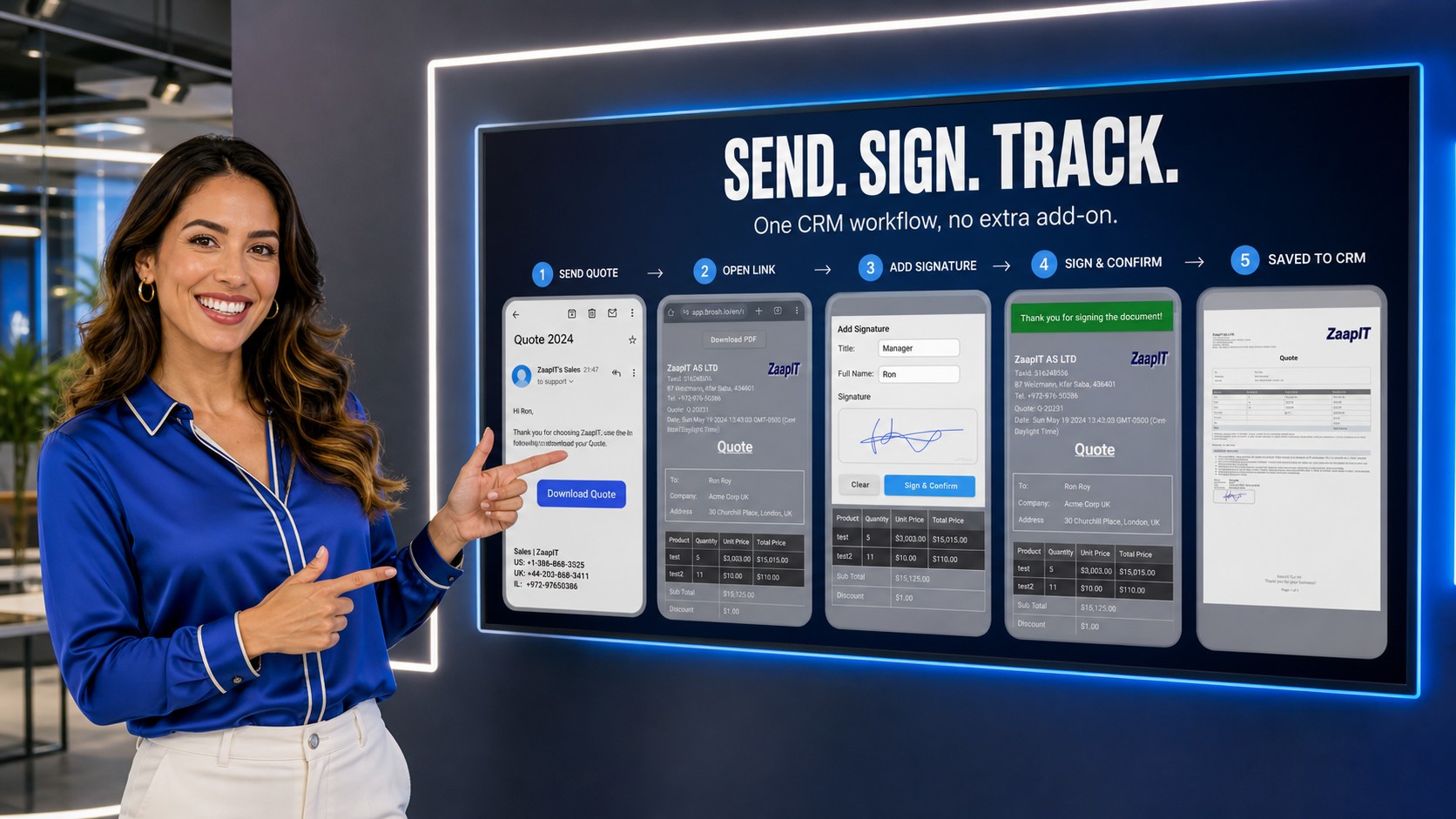
The signing journey becomes cleaner when send, sign, confirm, and save are part of one CRM flow.
Where the Huge Savings Come From
The biggest savings often come from removing hidden work. A separate signing tool may look inexpensive until the team adds user licenses, setup, template maintenance, document mapping, integration support, and manual attachment work.
No Extra Add-On Fee
BROSH includes e-signature in the CRM workflow, reducing the need for another paid signing subscription.
Less Integration Work
Teams avoid extra connectors, field mapping, sync problems, and document handoff rules.
Less Follow-Up Waste
Signed documents, open links, customer activity, and next tasks stay visible to sellers and managers.
That is why built-in signing is not just a feature. It is a cleaner operating model for quotes, contracts, proposals, forms, approvals, and customer documents.
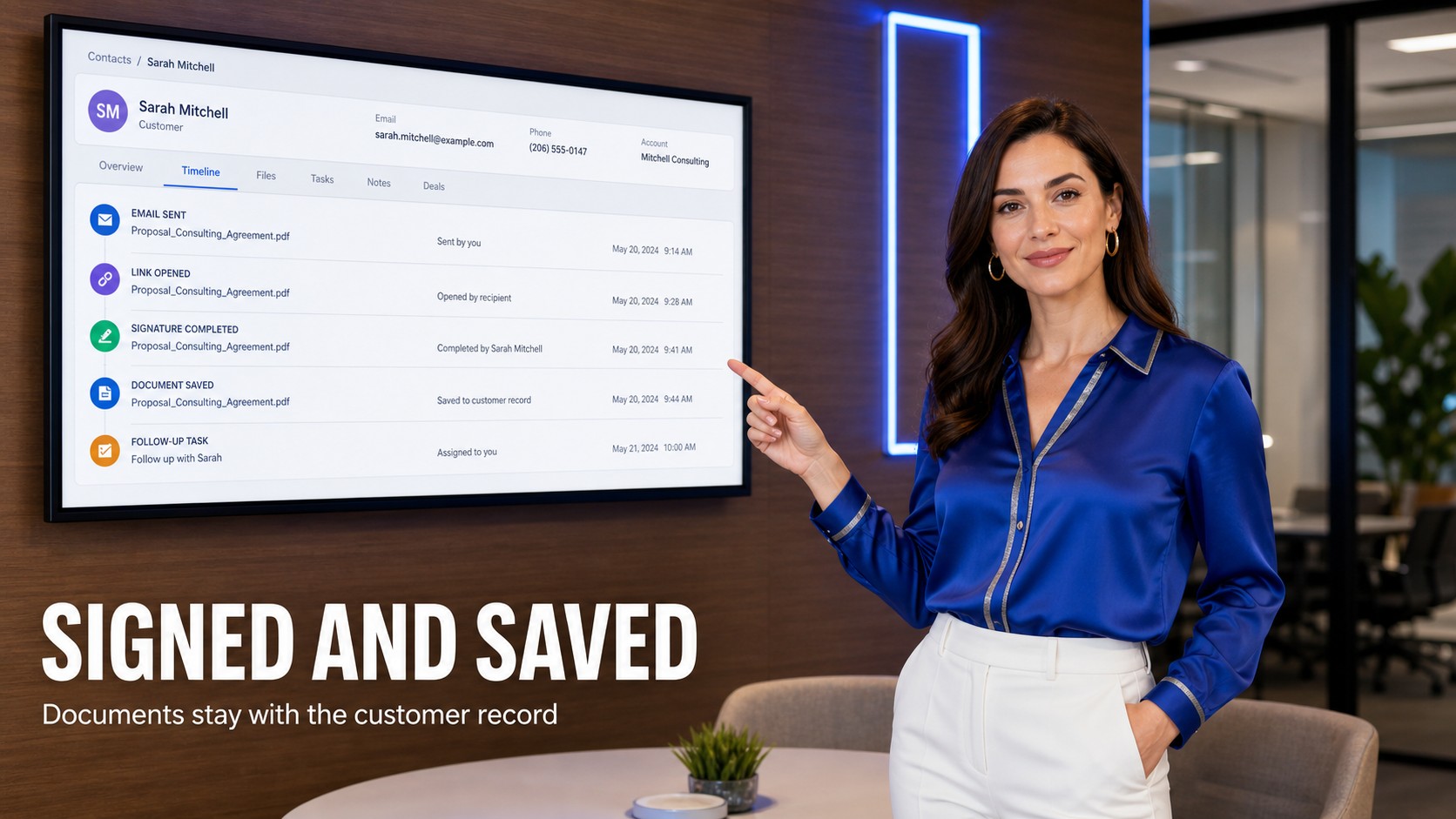
Signed documents should be saved beside customer history, activities, and next follow-up.
Keep Signed Documents Inside the Customer Timeline
Once a customer signs, the next question is: who knows, and what happens next? If the signed PDF sits in a separate app, the sales manager may not see it, operations may not know what to deliver, and the account owner may miss the next step.
BROSH CRM helps keep the signed document connected to the customer timeline. That means the team can see when the document was sent, opened, signed, saved, and followed up. This is especially useful for teams managing quotes, service agreements, onboarding documents, renewals, or customer approvals.
For teams that manage work visually, this can pair with Kanban pipeline visibility. For managers, it supports sales management because signed documents become part of the same operating view as owner tasks, quote status, and customer commitments.
How to Roll Out BROSH E-Signature
1. Start with quotes and proposals. These usually create the fastest return because sales teams need speed, visibility, and fewer handoffs.
2. Decide where signed files belong. Attach signed documents to the right customer, opportunity, quote, activity, or project record so the team can find them later.
3. Standardize the next action. After signing, create the follow-up: notify the owner, start onboarding, request payment, schedule delivery, or trigger an approval workflow.
4. Train the team around one workflow. The goal is not only collecting a signature. The goal is a cleaner revenue process from quote to signed document to customer follow-through.
Questions and Answers
Does BROSH CRM include e-signature without another add-on?
Yes. BROSH CRM includes e-signature for quotes and documents, so teams can send, sign, track, and save signed files inside the CRM workflow without purchasing a separate e-signature add-on.
How can built-in e-signature reduce CRM costs?
Built-in e-signature can reduce software subscription cost, integration work, data cleanup, user training, and support overhead because the signing workflow stays inside the same CRM record and customer timeline.
Where should signed documents be stored in a CRM?
Signed documents should be saved with the related customer, quote, opportunity, activity, or project record so sales and operations teams can find the agreement, status, and next follow-up without searching multiple systems.
Is electronic signature legally accepted for business documents?
Electronic signature laws vary by jurisdiction and document type, but the U.S. ESIGN Act recognizes that signatures and records generally cannot be denied legal effect solely because they are electronic. Teams should confirm requirements for their own documents and regions.
Close Deals Faster With Built-In E-Signature
BROSH CRM gives your team e-signature, customer records, quotes, documents, activities, and follow-up in one workflow, with no separate signing add-on required.