
AI Contact Capture for Cleaner B2B CRM Records
AI contact capture can help B2B teams turn buyer details into useful CRM records, but only when the process protects data quality, source tracking, ownership, and follow-up.
The goal is not to collect every possible contact detail. The goal is to capture the right information, verify it, avoid duplicates, assign an owner, and turn the record into a next action.
For BROSH CRM buyers, that means cleaner customer records, faster follow-up, fewer manual lookups, and less time wasted fixing incomplete or duplicated contacts.
Last modified by BROSH CRM, on Wed Aug 12 2026 Israel Time

AI contact capture works best when it creates clean CRM records with source, owner, and follow-up context.
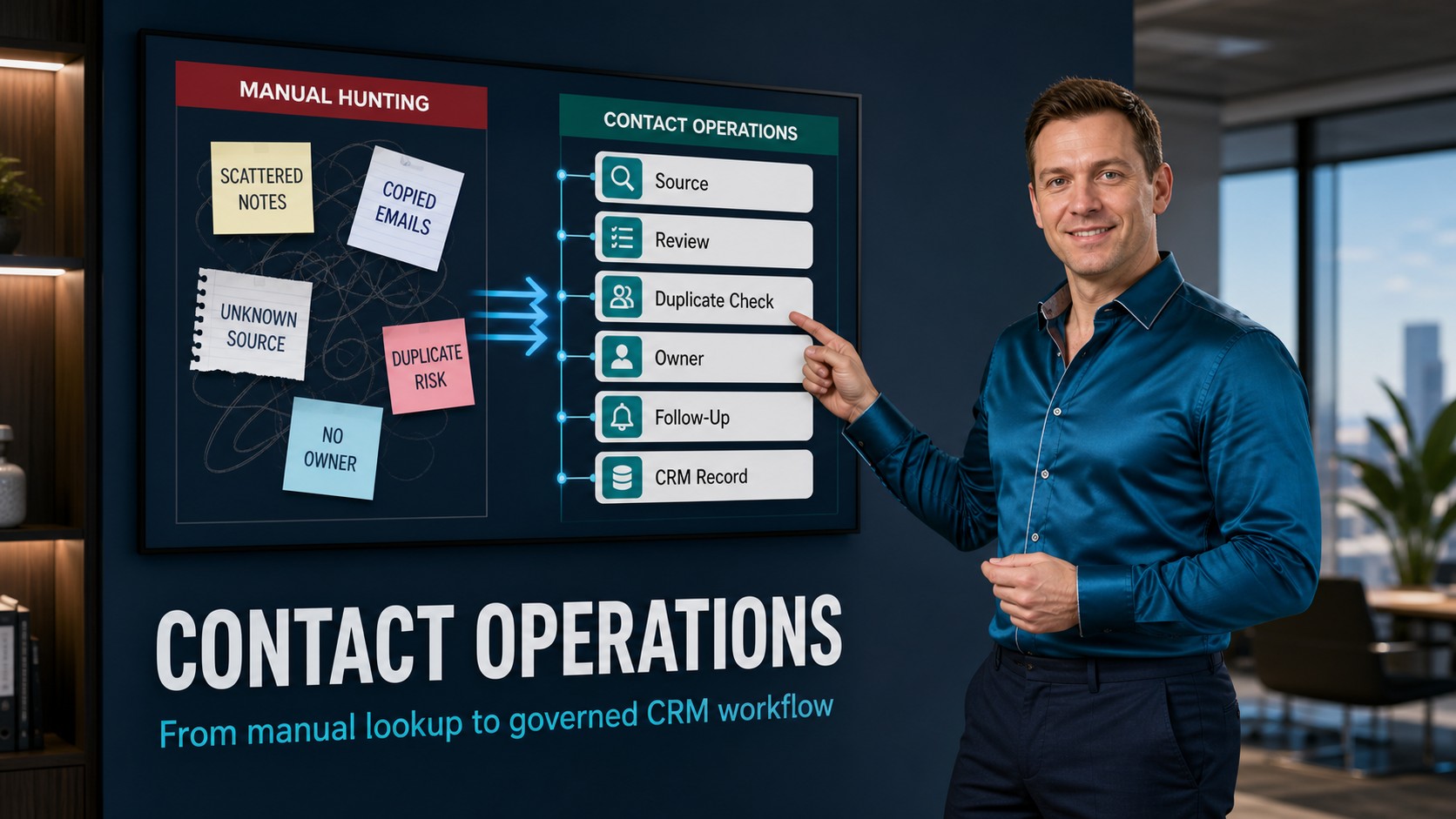
The strongest CRM contact workflow turns scattered contact hunting into reviewed contact operations.
From Contact Hunting to Contact Operations
Old contact acquisition was often a manual hunt: copy a name, search for a role, paste an email, guess a phone number, then hope the seller remembers why the contact matters.
AI can reduce that manual effort, but it can also create dirty CRM data faster if the team has no controls.
Turn Contact Capture Into a Governed Workflow
A modern contact capture workflow should be practical. It should help the team collect details from business cards, forms, email replies, meeting notes, and public sources, then place those details into CRM fields that sales and service teams can actually use.
The FTC privacy and security business guidance is a useful reminder that companies should think carefully about customer information, privacy, and security. The NIST Privacy Framework also helps teams think about data processing risk, governance, and accountability.
The OECD AI Principles point toward human-centered and trustworthy AI. For contact capture, that means AI should suggest, structure, and route information, while people still decide what belongs in the CRM and what action should happen next.
Capture Contact Details Without Creating Dirty CRM Data
The fastest way to damage CRM trust is to add contacts that nobody can explain. A good AI workflow should capture possible fields, show the source, flag missing details, and ask for review before the record becomes part of the sales process.
Useful fields include name, company, role, email, phone, website, country, lead source, owner, account match, duplicate risk, and the reason this contact is relevant. If the contact came from a form, meeting, business card, or public source, that source should be visible.
This pairs naturally with business card OCR, duplicate contact merge, and AI-ready CRM operations.
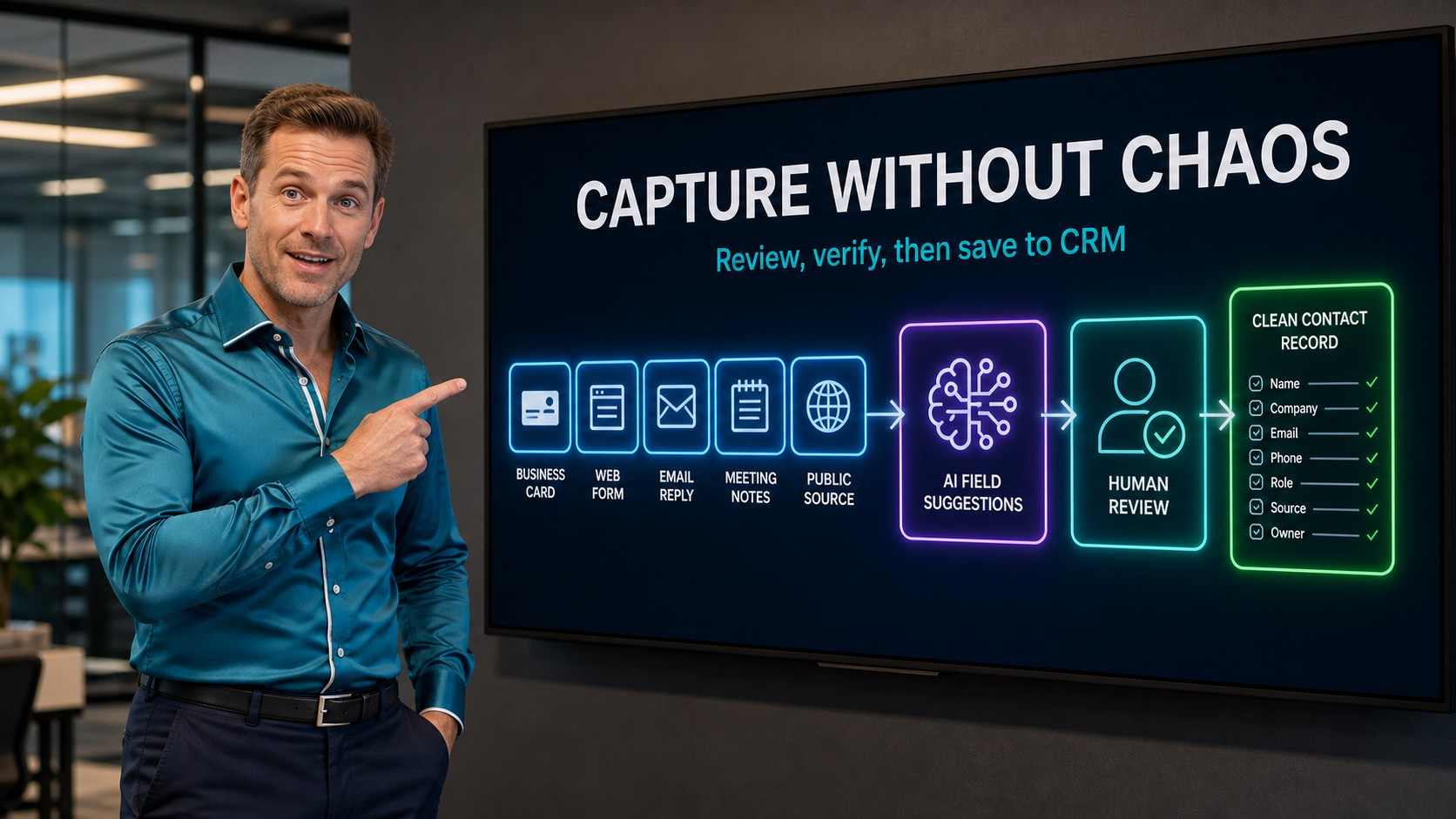
A clean contact workflow captures data, reviews it, checks the source, and saves a usable record.
Use the BROSH Chrome Add-On Without Switching Tabs
BROSH also has a Chrome add-on that helps sellers work directly from the browser.
When a seller is viewing a professional profile page, email page, or another website, the add-on can check whether contact details already exist in BROSH CRM and show the matched CRM record on the spot.
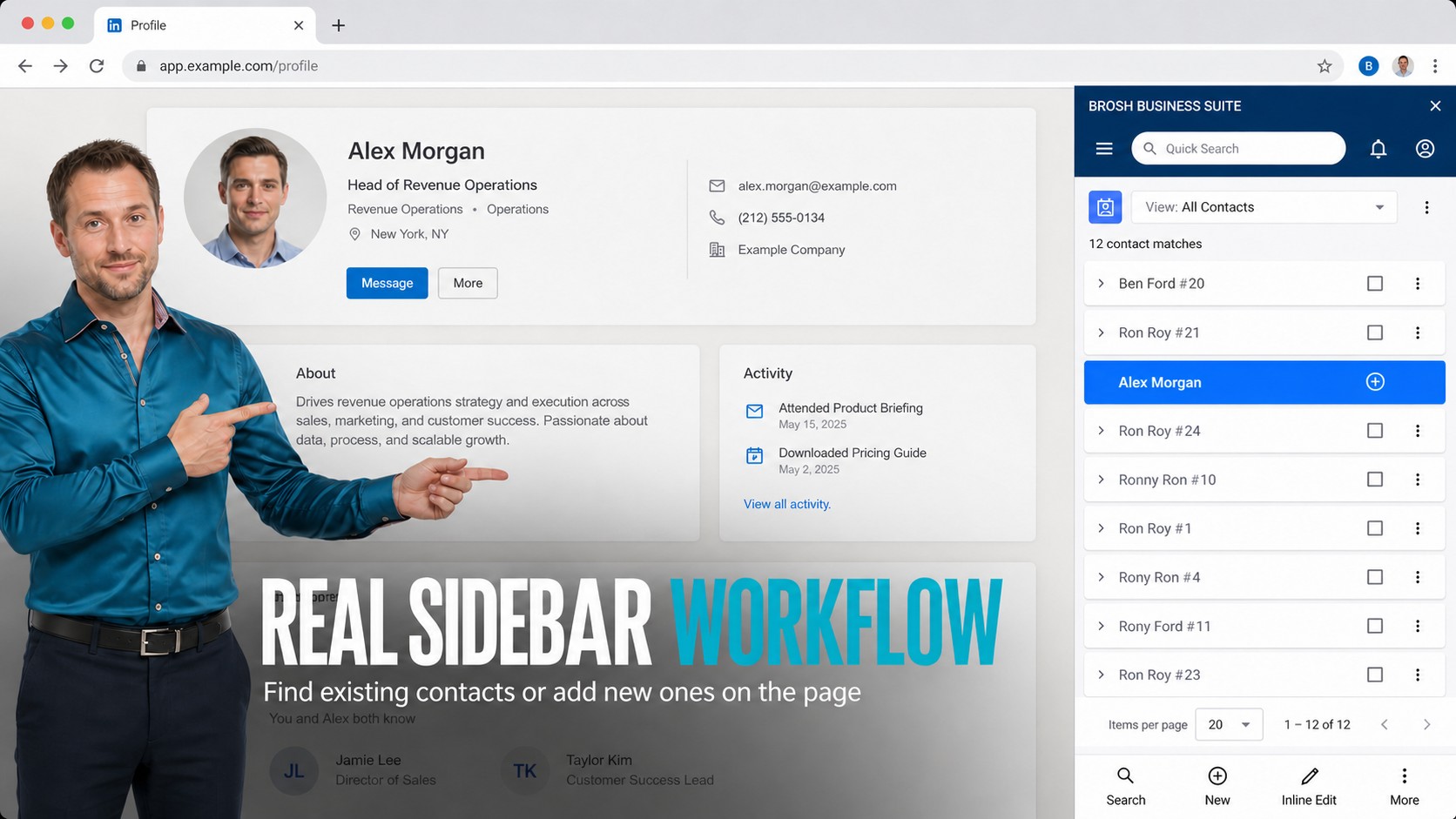
The BROSH Chrome add-on helps sellers find or add CRM contacts while they stay in the browser flow.

A seller can add the buyer while the profile, email, or page context is still visible.
Add a Contact While the Buyer Context Is Still Open
If the contact is new, the seller can add it immediately without navigating to another app, opening another tab, or copying details into a separate screen.
That matters because the best moment to capture a contact is often while the seller is already looking at the buyer context.
What BROSH CRM Should Capture First
Not every detail is equally valuable. B2B teams should prioritize fields that help a seller or manager take action: who the buyer is, what company they belong to, why the contact matters, who owns the relationship, and what follow-up should happen next.
Identity and Company
Name, role, account, company domain, and country help the team understand who the buyer is.
Source and Permission Context
Source, campaign, form, meeting, or public page context helps explain why the record exists.
Owner and Next Action
Assign the seller, schedule the follow-up, and connect the contact to an opportunity or task.
Clean capture also supports lead follow-up, next-best action workflows, and productive CRM habits.
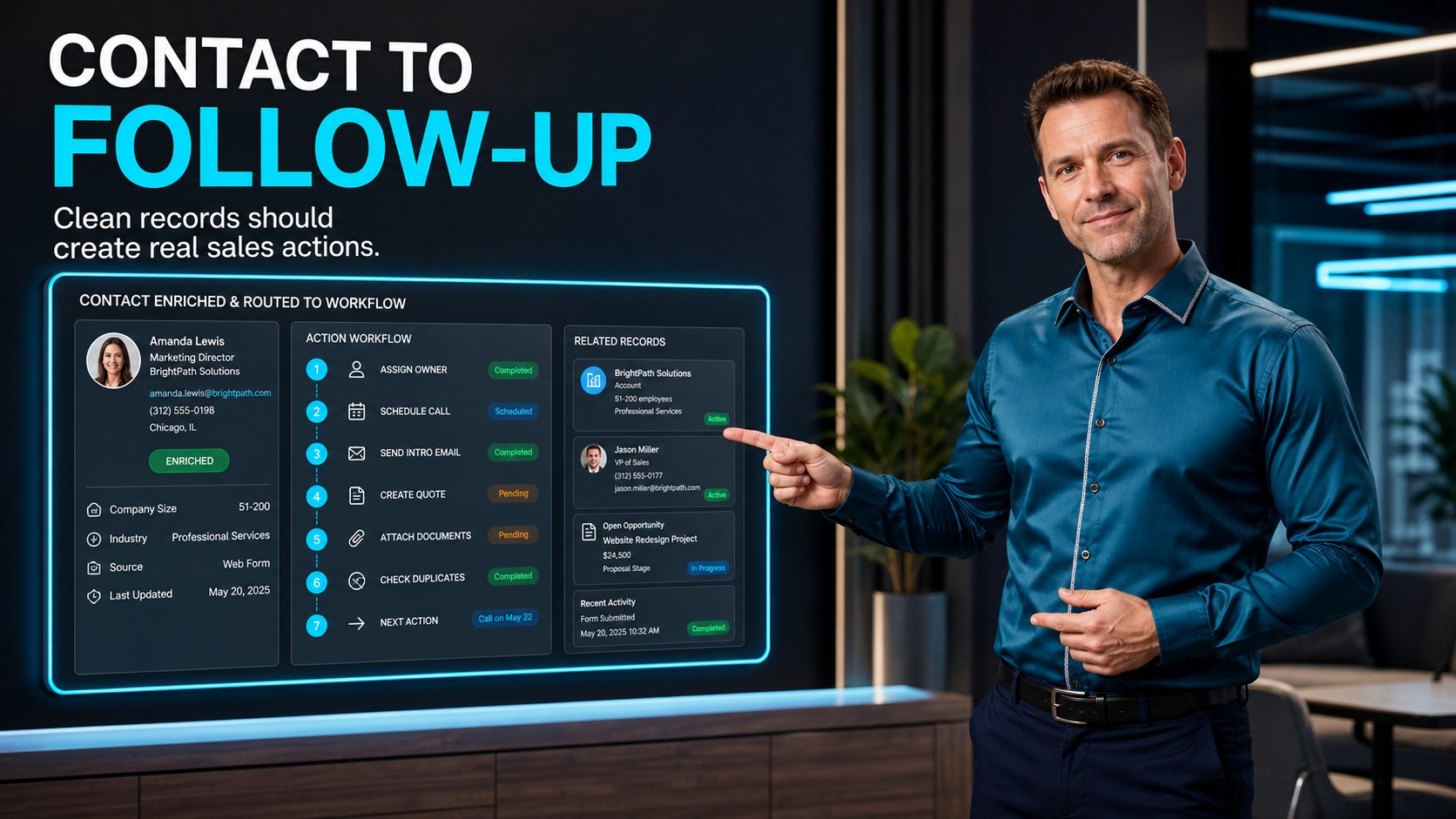
A contact record becomes valuable when it creates an owner, task, quote, document, or next conversation.
Turn New Contact Details Into Follow-Up, Quotes, and Tasks
The value of contact capture appears after the record is created. If the buyer is a fit, the CRM should help the team assign an owner, schedule a call, send an introduction, attach documents, prepare a quote, or create a task.
That is where BROSH CRM is stronger than a simple list of leads. Contact data can sit beside accounts, opportunities, quotes, documents, activities, reminders, and customer history. The team can see what happened and what should happen next.
This helps managers reduce dropped leads, repeated outreach, duplicate customer records, and unclear ownership. It also gives sellers a better starting point before the first call.
How to Roll Out Responsible AI Contact Capture
1. Define approved sources. Decide which forms, business cards, meeting notes, public pages, and inbound messages can be used for contact capture.
2. Require a review step. AI can suggest fields, but people should confirm important details before a record becomes active.
3. Check duplicates early. Match by email, phone, company, and name so the team improves CRM quality instead of multiplying records.
4. Route to action. Every useful contact should have an owner, task, follow-up date, or related customer workflow.
5. Measure quality. Track missing fields, duplicates, bounced messages, stale records, and completed follow-up so the process improves over time.
Questions and Answers
What is AI contact capture in CRM?
AI contact capture helps turn buyer details from forms, email replies, business cards, meeting notes, and public sources into structured CRM fields such as name, company, email, phone, role, source, owner, and follow-up task.
How should B2B teams avoid bad CRM data when using AI?
Teams should keep a human review step, record the source of each detail, check for duplicates, avoid unnecessary fields, and route only verified contacts into follow-up workflows.
Why is source tracking important for contact details?
Source tracking helps sales and operations teams understand where the contact came from, why the team is allowed to use it, who owns the next action, and whether the record should be updated or removed later.
How does cleaner contact data help sales follow-up?
Cleaner contact data makes it easier to assign an owner, schedule a call, send the right introduction, prepare a quote, attach relevant documents, and avoid repeated outreach to duplicate or incomplete records.
How does the BROSH Chrome add-on help with contact capture?
The BROSH Chrome add-on lets a seller check whether a contact already exists in BROSH CRM while viewing a professional profile page, email page, or other website. If the contact is new, the seller can add it from the same browser context.
Can the BROSH Chrome add-on reduce tab switching for sales teams?
Yes. The add-on helps sellers find existing CRM records or add new contacts without opening another CRM tab, copying details manually, or leaving the page where they are researching the buyer.
Turn Contact Details Into Clean CRM Action
BROSH CRM helps B2B teams capture contact details, keep records clean, assign owners, prevent duplicates, and turn new buyer information into follow-up that sales teams can act on.