
Buyer Enablement CRM Workflows for B2B Sales Teams
Help Self-Directed Buyers Decide Faster With Better Follow-Up, Stakeholder Notes, Proof, and Quote Visibility
Last modified by BROSH CRM, on Mon Aug 10 2026 15:08:14 Israel Time
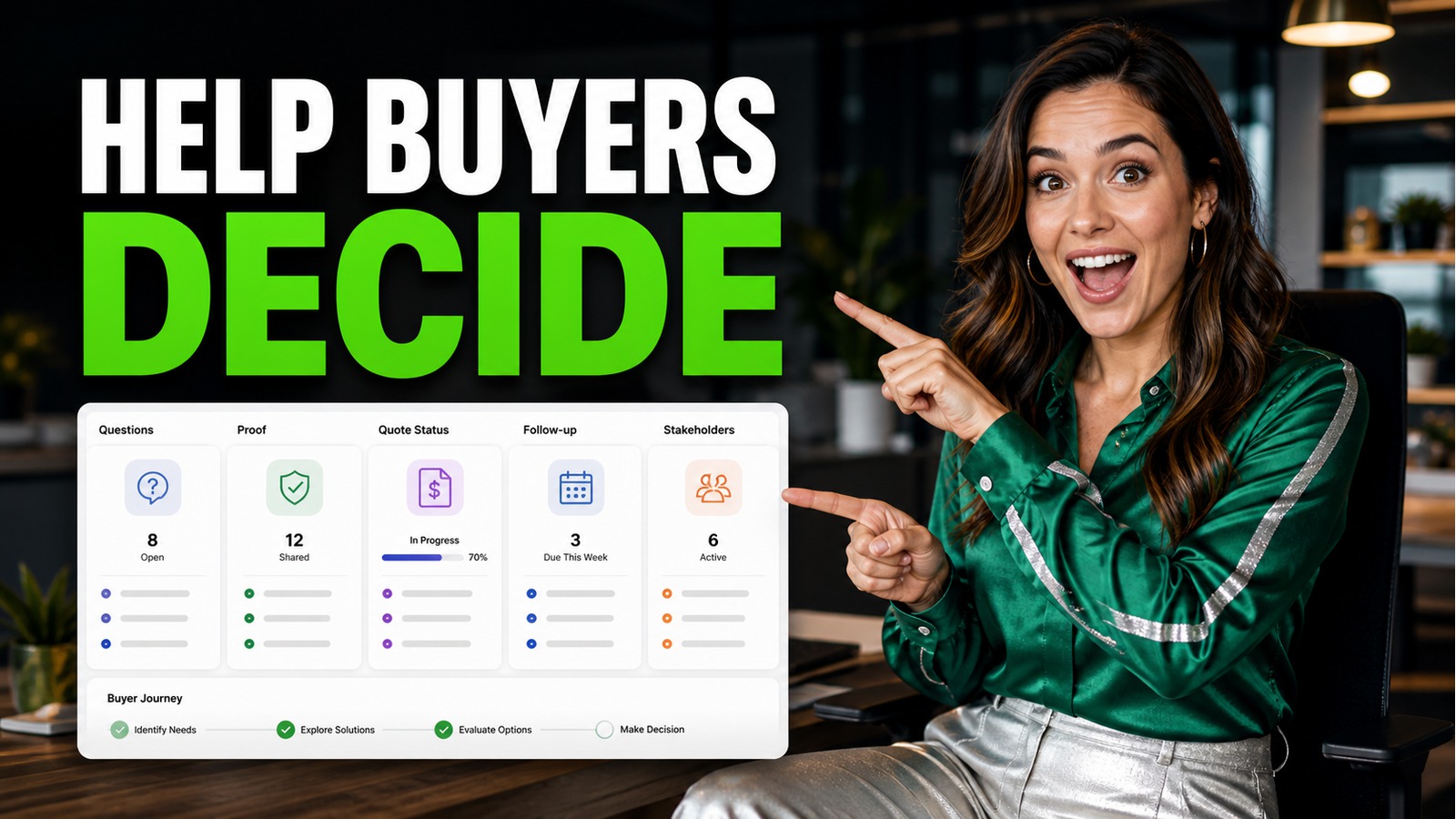
Why Buyer Enablement Belongs Inside the CRM
B2B buyers now do more research before and between sales conversations. They compare options, collect internal opinions, ask detailed questions, and look for proof that a solution fits their workflow. A CRM that only stores contact names is not enough for this buying process.
For BROSH CRM customers, buyer enablement means turning the CRM into the place where the sales team manages the buying committee's confidence: open questions, stakeholder roles, documents sent, quote status, follow-up tasks, and decision criteria.
Research from McKinsey on B2B sales shows that modern buyers use digital and human channels together. Gartner's B2B buying journey guidance also emphasizes that buying teams move through complex decision work before they choose a supplier.
This topic connects naturally to BROSH guidance on lead follow-up and customer journey planning, because buyer enablement starts when a buyer first asks a question and continues until the next step is clear.
Capture Buyer Questions Before They Become Objections
A self-directed buyer may arrive with specific questions about cost, implementation, users, documents, security, or approvals. If those questions stay in email threads or personal notes, the sales team loses the ability to respond consistently.
A buyer enablement CRM workflow records the question, connects it to the customer record, assigns an owner, and tracks whether the answer or proof was sent. This is especially useful when more than one stakeholder is involved.
If your team already uses CRM automation, connect question tracking to your next-action workflow. The related BROSH article on Intelligent CRM Automation is a useful next read for teams that want reminders, tasks, and automation to support the seller instead of replacing judgment.
The image beside this section shows the operating model: buyer questions, decision criteria, follow-up tasks, stakeholder notes, quote status, and confidence signals in one management view.
Buyer questions should be managed as revenue work, not left as loose notes.
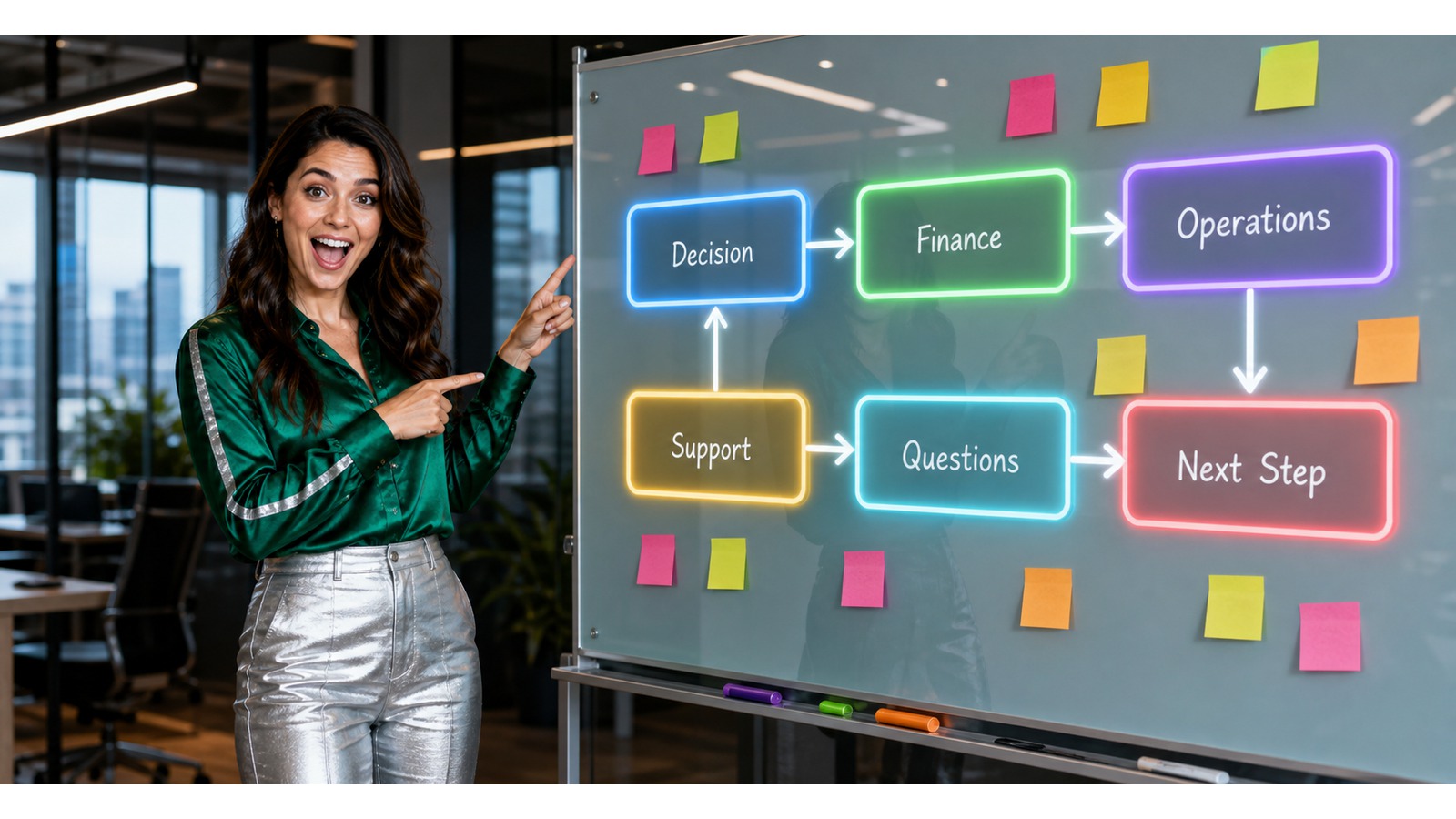
A stakeholder map helps the team understand who needs proof, approval, training, or reassurance.
Map the Buying Committee in Plain Language
Most B2B deals involve more than one person. The decision maker may care about business impact, finance may validate cost, operations may care about daily use, and support may care about onboarding or service continuity.
A CRM stakeholder map does not need to be complicated. It should show each role, their concern, the next action, and the last meaningful contact. That gives the sales team a way to help the buyer move internally.
When documents or approvals are part of the buying process, connect the stakeholder map to document workflows. BROSH also has a relevant page about e-signature in CRM for teams that need proposals, contracts, or approval documents to stay close to the customer record.
When BROSH CRM keeps stakeholder notes beside documents, tasks, and opportunities, the account manager can prepare better follow-up and avoid repeating the same conversation.
Use AI Carefully: Better Summaries, Still Human Judgment
AI can support buyer enablement by summarizing account history, surfacing missing next steps, and helping the team prepare a relevant response. But buyer confidence still depends on accurate records, clear ownership, and human review.
The NIST AI Risk Management Framework is a useful reminder that AI systems should be governed and measured. In a CRM workflow, that means people should review recommendations before they affect a customer relationship.
For a BROSH CRM buyer, the starting point is not a large AI project. It is a clean workflow where tasks, documents, customer history, and quote status are structured enough for automation to help. Teams exploring AI-connected CRM architecture can also read about the BROSH Headless CRM MCP.
Buyer Enablement Workflows to Build First
Question Tracking
Record buyer questions, assign answer owners, and track whether proof or clarification was sent.
Stakeholder Notes
Keep decision roles, concerns, meetings, and next actions visible beside the opportunity.
Proof and Quote Status
Connect documents, proposal status, approvals, and follow-up tasks to the same customer record.
These workflows help managers see whether a deal is moving because the buyer has confidence, not just because the pipeline stage was changed. For teams managing opportunities visually, the BROSH post about streamlining the sales pipeline with Kanbans gives another practical workflow angle.
Make Buyer Confidence Visible Before the Close
A CRM can help a team spot risk before the buyer disappears. If the quote was sent but no proof was delivered, if finance questions are open, or if no next meeting is scheduled, the opportunity needs attention.
Useful confidence signals include buyer questions answered, documents sent, stakeholders covered, next follow-up date, quote status, and pipeline risk. These are simple fields, but they change management behavior.
The image beside this section shows how quote status, proof sent, document checklist, and pipeline risk can sit in one revenue view for a manager or owner.
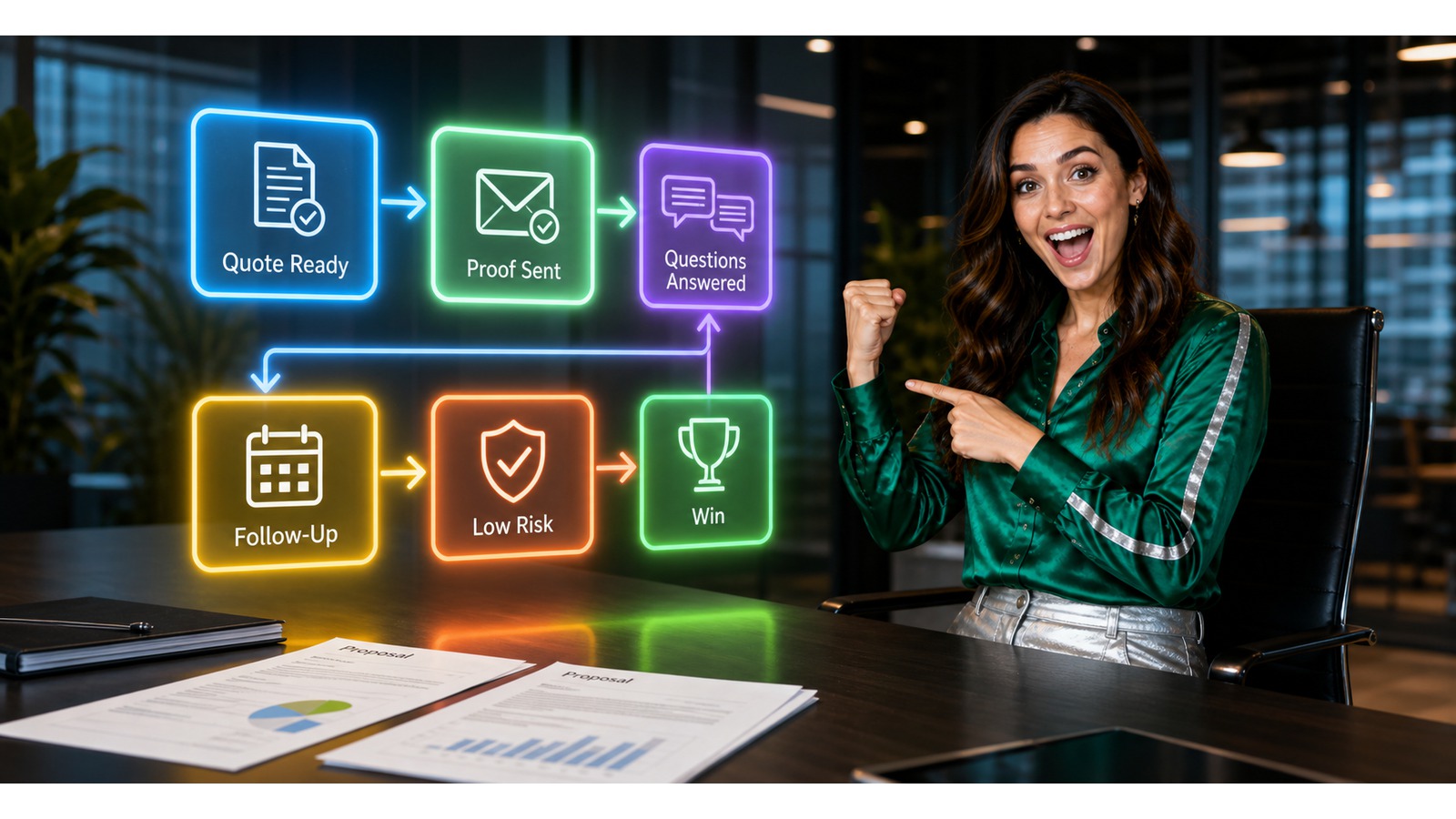
Buyer confidence becomes easier to manage when proof, quote status, and follow-up are visible together.
A Simple 14-Day Buyer Enablement Setup
Days 1-3: list the questions buyers ask before they approve a CRM, service, proposal, or recurring business relationship.
Days 4-7: add simple CRM fields for stakeholder role, open question, proof sent, quote status, next follow-up, and owner.
Days 8-11: connect documents and tasks to the opportunity so the team can see what was promised and what is waiting.
Days 12-14: review active opportunities and flag deals with no next action, missing proof, or unanswered buyer questions.
Questions and Answers for BROSH CRM Buyers
What is buyer enablement in a B2B CRM?
Buyer enablement in a B2B CRM means organizing the information, tasks, documents, stakeholder notes, quotes, and follow-up steps that help a buying team make a confident decision.
Why does buyer enablement matter for BROSH CRM customers?
BROSH CRM customers often sell through conversations, documents, quotes, and repeated follow-up. Buyer enablement helps the team answer questions faster, keep decision criteria visible, and prevent opportunities from stalling.
Which buyer enablement workflow should a sales team build first?
Start with the workflow that blocks decisions most often: unanswered buyer questions, missing documents, unclear quote status, stakeholder alignment, or overdue follow-up tasks.
How can a CRM support buyers who research before contacting sales?
A CRM can capture buyer questions, connect them to useful proof, track which documents were sent, record stakeholder concerns, and remind the sales team when the next helpful follow-up is due.
What should managers measure in a buyer enablement workflow?
Useful measures include unanswered questions, overdue follow-ups, documents sent, stakeholder coverage, quote status, proposal cycle time, and opportunities with a clear next step.
Can AI help with buyer enablement without replacing the sales team?
Yes. AI can help summarize account history, identify missing next steps, and suggest useful content, while salespeople still manage relationships, approvals, negotiation, and customer communication.
Ready to Help Buyers Decide Faster?
BROSH CRM can help your B2B team keep buyer questions, stakeholder notes, documents, quotes, and next follow-up tasks in one practical customer workspace.
Start with one active opportunity and map the buyer enablement workflow your team needs most.